

I am notoriously overwhelmed with a to-do list in my head. I go through a phase where I am good about writing my list down daily and then for one reason or another, I abandon it. It is frustrating because when I have a to-do list, I function so much better. I consistently get more done, I don’t feel scattered, I’m more confident and I feel more focused. But if that is the case, why can’t I stick with it? I’ve been back and forth with this for years and that got me thinking. I needed to evaluate the reasons why my to-do list gets abandoned. After honest thought, here are my top 5 + 1 issues:
- I think I can handle a small list in my head (wrong)
- All or Nothing struggles
- Desk space
- Digital Peer Pressure (thinking I need every device to sync my to do list)
- I buy a fancy planner and waste 50-80% of it. I hate wasting it.
- Room to write
- Due Date Distraction
- Everyone Else’s Concept of the Perfect To-Do List
So, let’s start at the beginning. No, I do not manage a list in my head very well. It consumes my thoughts and I worry I am not getting it done. I tend to force an odd priority list where it is all or nothing. I don’t break a huge task into smaller tasks because I am using energy to remembering the BIG task. As for desk space, mine is pretty crowded. So, I need something that is easy to partially stash out of my way. I also feel this need to think that my to-do list can be sync’d to every imaginable device. But no, that really is not true at all. I mostly need to have a single place I can view it. I have also merged the to-do list idea with keeping a fancy planner/journal. Unfortunately, I waste most of the journal and a lot of my time trying to make it work how I imagine. Combine that trying to fit my thoughts into a tiny section 1 – 3 words max: Nope! My work deals with non-stop due dates. While home life has plenty of those, it distracts me from just crossing off little items. Finally, I have to filter out everyone else’s design of the perfect To-Do list. It’s interesting that other people’s expectations/concepts often play a role in my derailment. So, with that, I started looking at a few options.
Computer/Digital To Do List/Planner – while this always attracts me (because I develop software), I still like to physically write things down. I don’t want to wait for my machine to wake up or reboot to jot something down or to check the list. I don’t like the disappearing list. I want a history of what I’ve been doing. I also don’t want to be forced to add due dates or set up reminders.
IPhone/IPad Application – For now, it’s a NO. Too cramped on IPhone. And I don’t want to wait for my IPad to wake up, enter passcodes and find the specific list. In the past, I have even missed items because they were off screen. For some reason, it messes with the way I organize to-do items. Worst of all, I have accidentally deleted or checked off items that were not actually done and could not easily throw a note on an item. I will say IPad is moderately better, but logging in, recharging, etc just invites me to neglect it.
Sticky Notepad to-do lists – At first glance, this appeals to me (pun intended). But I like to have history (even for a short time). I think most people are attracted to the idea of sticking it on their planner and moving it as needed. As tempting as that is, it is not good for the way I work. I am more focused if I have the choice of getting it off my previous list or having to write it repeatedly for the next day until I get it done. Otherwise, I’ll just keep ripping up that sticky and placing it on the next day.
Fancy Printed Planner – There is something soothing to me when shopping for a planner (I love Barnes and Noble for this). But once I get it, I realize the scheduling is not really helpful, the to-do list is so tiny and cramped and I waste so much of it OR I try to re-purpose the space and it’s a mess. Or worse, Iit is so fancy, I don’t want to scribble in it. As many wasted planners that I have, I am going to do a hard pass on this.
Dedicated notebook (simple) – Now we are starting to get somewhere. 8.5 x 11 is too big to manage on my desk, so I opted for a smaller project notebook. Based on what I realized above, I committed this notebook to my To Do list. Right out of the gate, I got a ton done. It was easy to stick to it. I tackled some stressful projects and used the smaller tasks as filler when I needed a break. That was an ah-ha moment for me. For some reason, when the list is in my head I spend too much time guilting myself on prioritizing. I gave no credit for small tasks. However, my dedicated written list lets me break down tasks into smaller tasks so I actually feel movement forward. I also noticed I was more relaxed during my downtime because I wasn’t constantly rehashing what I needed to do the next day. The only drawback I found with a regular notebook was that the paper easily curled on the edges
from me moving it around too much (especially, the pages underneath). My writing and highlighting would also bleed through on the following page. So, I tended to never use the back of the page. Another downside is that having a blank notebook invited other things to jot down. But all in all my project notebook did pretty well.
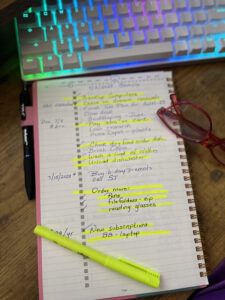
Special Purpose To-Do Notebook (the winner!) – There are plenty of these out there (on Amazon). However, most start leaning towards the fancy planner style with multiple sections. I really don’t want to squish up my to-do list and fit it in multiple columns. So, I found a simple minimalist note
book and it worked perfectly! I stuck with a spiral style notebook as opposed to top spiral because I simply like the book style. Here is one that I like. It is a tad bigger than my generic notebook, but it fits perfectly under my monitor out of the way. I like the additional space next to the checkbox for a comment, due date or even a doodle! I am neutral about
the months and dates at the top. I would much rather write them in. But they do not get in my way. I am also happy that the paper is a tad sturdier than a standard notebook, but not so much that it feels wasteful to scribble things down quickly. I used the backside (as pictured) and there was no bleed through.
You can get this Notebook on Amazon here.
To Do List Therapy
Creating a To Do list by hand is therapeutic. If you feel constantly overwhelmed, it is a good way to train your brain. As you get even the smallest task off the list, you can visually see those marked through (or in my case, I highlight them when they are done). There is no need to break down all the huge tasks immediately because you have a reminder of what you have already done.
One of my most stressful tasks is doing my corporate/personal taxes. In my mind, I think of it as monumental task that will take me days to conquer. But on a list, I start with something simple like:
-
- Locate/Organize 2023 documents
- Scan documents
- Locate missing documents (and scan them)
- Compute amounts and update 2023 spreadsheet
- etc. etc….
- Locate/Organize 2023 documents
Compare that to the monumental stress I felt knowing I needed to tackle a very huge task. I had a big problem focusing on just one task and would jump around. The next day, I couldn’t remember if I scanned everything or where I left off. In the midst of it all, I would have a new work deadline or another interruption that felt absolutely devastating to my timeline.
Being down to the wire is not fun. When I feel overloaded, I am grumpy and unhappy. But get just a few items off the list, and it feels liberating. Amazingly, I can also put it down and actually relax without a big knot in my stomach. Honestly, I did not think that was even possible when it came to taxes.
I would guess that probably 75% of my organization issues is not recording something as soon as I think of it. I have software/spreadsheets for financial transactions or bills but I attempted the same thing with a dedicated notebook for recording financial transactions (like paying Estimated taxes!). While having a dedicated notebook for that sounded like a good idea, I found that my To-Do notebook works perfectly for it. Afterall, Historically, I can page back through my To-Do notebook and record expenditures, payments, subscriptions or whatever at a more convenient time. Best of all, I know when the transaction occurred and can revisit history as I like. I am going to even pull out a different highlighter and mark those in a different color to see if it helps.
Nobody taught me this in school. Yeah, I heard people say put it on your to-do list, but it might have helped to have a time management class that made me evaluate my own issues instead of pushing a one size fits all approach. So, I think for the next several weeks I am going to evaluate the whole To-Do list methodology and see if I can stick to it. If you are feeling buried under too many tasks, take some time to re-evaluate your own to-do methodology. While it is not going to lighten the load, it will give you a sense of accomplishment and a documented history. It may keep evolving and I highly recommend you re-evaluate your system when it doesn’t seem to be working. It may light years different from what I discussed with mine. That is more than OK. We are not all the same and should not be herded into a one-size-fits-all approach. The point is that instead of feeling like you need to do something a certain way, take the time to evaluate your own personality, issues and needs. Then find a method that works for you.
